Git 配置文件
.gitignore
INFO
自己手动编辑 .gitignore 之前, 建议参考 A collection of useful .gitignore templates.
基础语法
# 忽略任意层级的路径下的所有 .exe 文件,
# 不需要使用类似于 **/*.exe 的语法.
*.exe

# 但要追踪任意层级路径下名为 sample.exe 文件.
!sample.exe

# 忽略所有 /build/ 路径下的内容,
# 这里使用通配符 `*` 的原因是: 为了让后面追踪子路径的配置起效.
# 如果后面不使用 `!` 这种语法追踪子路径, 则应该移除通配符 (`/build`).
/build/*

# 但要追踪 /build/docs/ 路径.
!/build/docs/

# 支持简单的正则表达式.
[Bb]in/
*.csproj
路径规则
路径开头如果没有斜杠 /, 则会匹配 "任意层级的路径", 不仅限工程根目录.
例如 bin/ 就会让 git 忽略工程内所有名称为 bin 的文件夹.
解析顺序
.gitignore 的解析存在先后顺序: 从上到下, 下面的会覆盖上面的.
因此如果多个配置存在冲突, 那么总是以下面的配置为准.
*.exe
!sample.exe!sample.exe # 相当于没有这一行
*.exe多个文件
.gitignore 文件 不局限于工程根目录, 还可以放在工程中的任意路径下.
例如希望将某个路径下的所有文件忽略, 就可以在这个路径中创建 .gitignore 文件, 并写入:
*.gitconfig
影响范围
这里所说的 .gitconfig 是指以下所有文件:
| 影响范围 | 常见路径 | 命令行参数 |
|---|---|---|
| 当前代码仓库 | [project]/.git/config | git config --local |
| 当前操作系统用户 | ~/.gitconfig | git config --global |
| 当前操作系统 | /etc/gitconfig | git config --system |
影响范围越狭窄, 则优先级越高.
例如上述优先级最低的就是操作系统层面的配置.
如果想得知所有 gitconfig 以及这些配置的来源, 可以这么做:
# 列出所有配置项及其来源
git config --list --show-origin
推荐配置
这里记录笔者推荐配置:
.gitconfig 推荐配置
在各操作系统中通用的配置:
# 设置用户名, 建议使用 GitHub 用户名, 且由小写字母组成.
git config --global user.name xxx
# 设置邮箱, 建议使用 GitHub 账户的邮箱.
git config --global user.email xxx

# 执行 git init 命令时的默认分支名设置为 main.
git config --global init.defaultBranch main

# 使用 git-credential-manager 管理凭证.
git config --global credential.helper manager
# 也在 --system 这一层一并做设置.
git config --system credential.helper manager

# 在 git pull 时使用 rebase, 而不是默认的 merge.
git config --global pull.rebase true

# 让 git 支持长文件名/长路径.
git config --global core.longpaths true

# 禁止 git pull 时自动将代码的换行符转换成当前系统的换行符.
git config --global core.autocrlf false

# 让 symbolic link 可以在 pull 时正常被创建.
# 注意: 在 Windows 系统中需要开启 Developer Mode.
git config --global core.symlinks true

# 改动日志中显示中文文件名.
git config --global core.quotepath false

# 每次 git fetch 时自动写入 commit-graph.
git config --global fetch.writeCommitGraph true

# 启用后台进程检查改动, 使得大型工程下的 git status 命令更快响应.
git config --global core.fsmonitor true

# 让 git 记住之前如何手动解决冲突, 并在之后遇到相同冲突时复用.
git config --global rerere.enable true

# 使得各种 git 命令默认不忽略 submodule.
git config --global submodule.recurse true

# 做全局配置, 禁用 git lfs 的 locksverify 功能, 避免以下错误:
# Remote "origin" does not support the Git LFS locking API
git config --global lfs.locksverify false

### ---------- 别名 alias ---------- ###

# 新增 git lg 别名, 能够以更清晰的方式显示 commit 历史.
git config --global alias.lg \
    "log --color --graph --pretty=format:'%Cred%h%Creset -%C(yellow)%d%Creset %s %Cgreen(%cr) %C(bold blue)<%an>%Creset' --abbrev-commit"

# 新增 git pushff 别名, 强行覆盖远程时, 确保已经在本地处理了远程分支的所有 commit.
git config --global alias.pushff "push --force-with-lease --force-if-includes"

# 新增 git sc 别名, 用于替代 git sparse-checkout.
git config --global alias.sc sparse-checkout

# 新增 git sm 别名, 用于替代 git submodule.
git config --global alias.sm submodule
不会被同步
所有 .gitconfig 的配置都 不会 与其他协作者同步.
如果有需要通过代码仓库同步的配置, 请使用 .gitattributes.
如果非常希望将某个工程中的 .gitconfig 配置同步, 有一个差强人意的方案:
(参考 Store your git hooks in a repository and setup them for all the developers).
在代码仓库根目录创建任意名称的文件 (为了直观可以就使用 .gitconfig 这个名字).
这个文件默认会被 git 追踪 (就像代码仓库中的其他文件), 但不会被 git 当作 config 来解析.
此时我们可以让 每个开发者 在首次 git clone 之后执行以下命令:
git config include.path ../.gitconfig以上命令实际上是在当前仓库的 .git/config 文件中添加了以下内容:
[include]
    path = ../.gitconfig
错误记录
在 Windows 可能会在涉及到 https 协议时触发 credential 相关弹窗,
者通常会出现在更新了 git 之后. 解决方案是, 在更新后执行以下命令:
# 使用 git-credential-manager 管理凭证.
git config --global credential.helper manager
# 也在 --system 这一层一并做设置.
git config --system credential.helper manager
在 Windows 中, 有时候会在 git push 时长时间看到速度为 0 B/s:
Uploading LFS objects: 0% (0/1), 0 B | 0 B/s此时的解决方案是做如下配置:
# , 使用 Windows 系统的自带的 ssh 命令来执行 ssh 协议相关操作.
git config --global core.sshCommand "'C:\Windows\System32\OpenSSH\ssh.exe'"
.gitattributes
.gitattributes 用于配置 git 处理仓库中文件时的行为.
换行符转换
# 将文本文件的换行符自动转为 lf
* text=auto eol=lf
上面的 text=auto 告诉 Git 尝试自动检测文件是否为文本文件.
如果 Git 判断文件为文本文件, 将按照后面的 eol 规则进行处理.eol=lf 用于指定在仓库中存储时将换行符转换为 lf (Unix/Linux 风格的换行符).
语言统计
# 将 markdown 文件也纳入语言统计.
*.md linguist-detectable=true
默认情况下, GitHub 不会将 markdown 纳入编程语言统计 (显示在仓库主页的右侧).
如何某个仓库主要由 .md 文件组成 (例如文档仓库), 那就希望能将 markdown 纳入统计.
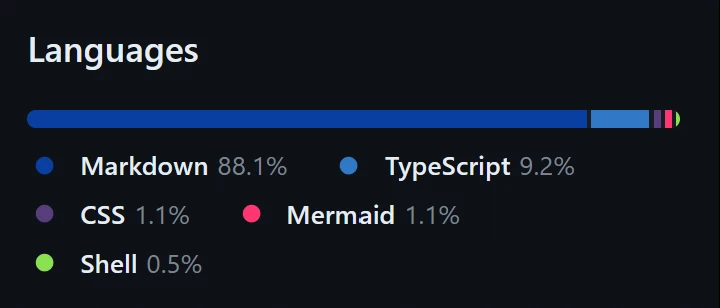
另外还可以通过以下方式做更多配置:
(详见 stack overflow 的这个回答)
# 将 commitlint.config.mjs 从语言统计中移除.
commitlint.config.mjs linguist-detectable=false

# 让 docs 路径下的文件也当作代码来统计.
docs/** linguist-documentation=false

# 将 vendored-path 路径下的文件从语言统计中移除.
# 这通常用于 "从其他地方复制过来的代码文件".
vendored-path/** linguist-vendored=true
Git LFS
详见 Git LFS 大文件存储 文档.
# 列出 Git LFS 所追踪的文件类型
*.jpg filter=lfs diff=lfs merge=lfs -text
*.png filter=lfs diff=lfs merge=lfs -text# 相当于输入以下命令
git lfs track "*.jpg"
git lfs track "*.png"